A Manual Data File
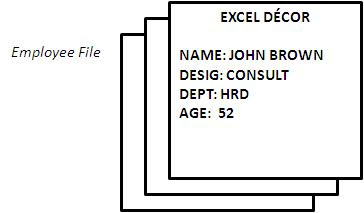
Let us now look at how a company manually stores its data. In a manual system, data is stored in the form of a file. A manual file may contain the particulars of each employee in a company (refer Figure).
The manual employee file of a company has several cards, each with the details of one employee. The data to be used in a computer is also stored on a storage media i.e. the floppy disk or hard disk, in the form of a data file. However, a computer data file does not look like a manual data file. Data in a computer file is organized in a different manner (refer Figure).

A Computer Data File
where
DESIG = designation
DEPT = department
AGE = age of the employee.
In a computer file, the particulars of each employee are contained in a single line. This is referred to as a record. For example, the complete data about employee ANN MURRAY, regarding his designation, department and age, is one record. Thus, a computer file is more compact than a manual file.
Each piece of data in the record is called a field. A field has two components—the field name and the field content (refer Figure). NAME, DESIG, DEPT and AGE are field names. Each record in the file contains these four fields. The field contents are JOHN BROWN, MARY MILLER, CONSULTANT, HRD, 52, etc. The contents of a field usually differ from record to record. You will recall that a character is any alphabet, numeral or symbol, such as %, *, etc. Each field comprises a number of characters. To sum it up, a field comprises several related characters, various related fields make up a record and many such records make up a file (refer Figure). Fields in the records have names.


